
What if drafting a financial affidavit didn't involve endless emails and attachments?
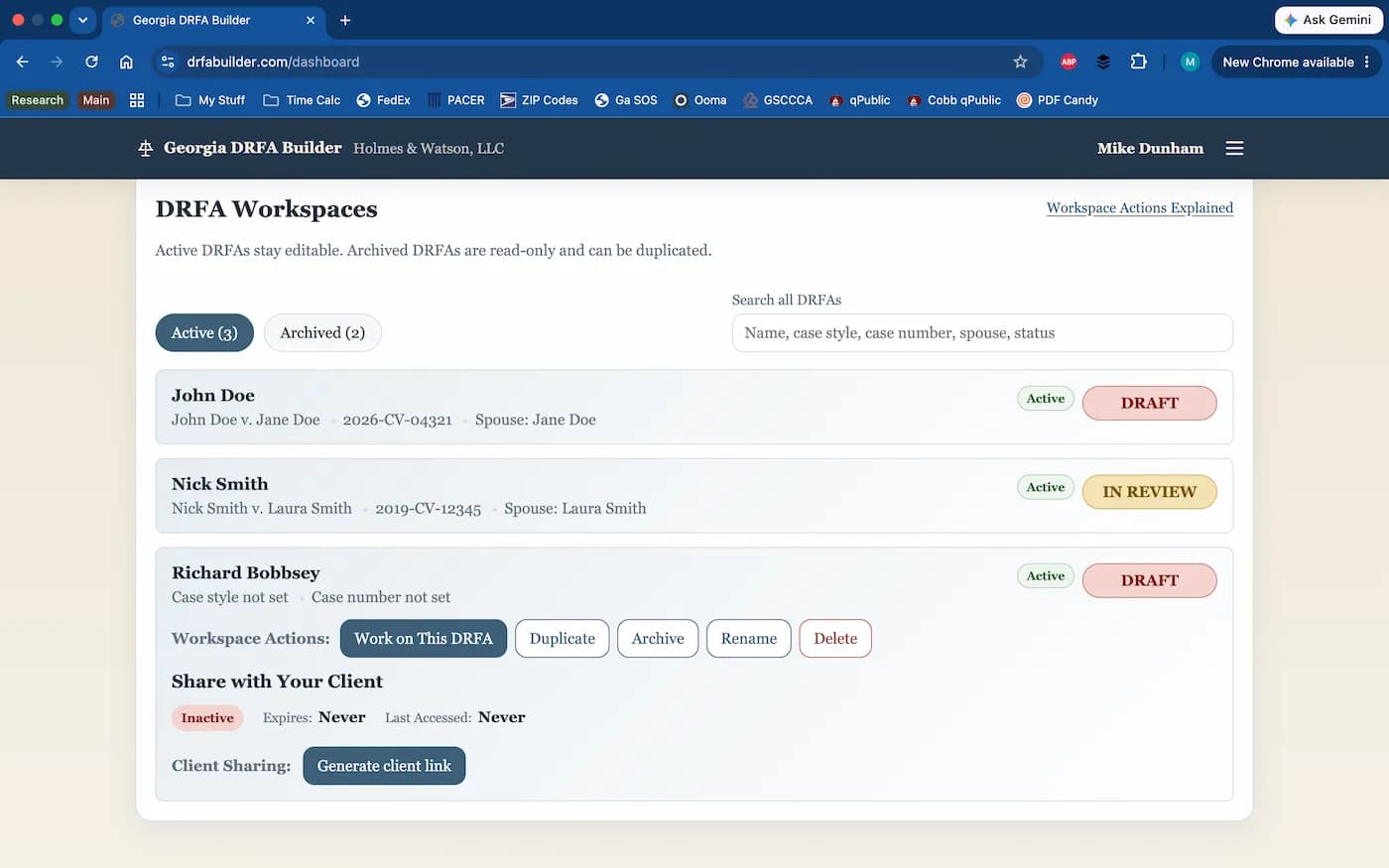
Georgia DRFA Builder replaces email chains, Word documents, and handwritten corrections with a secure shared workspace where Georgia attorneys and their clients draft DRFAs together, keeping everything organized in one place from start to finish.
Start with our full-featured Starter plan. It's free forever, with no commitment required.

It's Thursday. 4:30 p.m.
You're about to email your client for the fifth time in three weeks asking for the information you need to finish drafting a DRFA. Before you can do that, you need to review the bank statements they sent last week. Were those attached to an email? Saved in your Downloads folder? Or did your paralegal already move them into the client file?
Meanwhile, your client has emailed three corrections to the draft you sent Monday, handwritten notes on a printed copy yesterday, and a text message this morning reminding you they forgot to mention another retirement account.
By the time you're done, you'll have touched half a dozen emails, several attachments, at least two different versions of the affidavit, and who knows how many supporting documents.
There's got to be a better way.
Georgia DRFA Builder offers a better way.
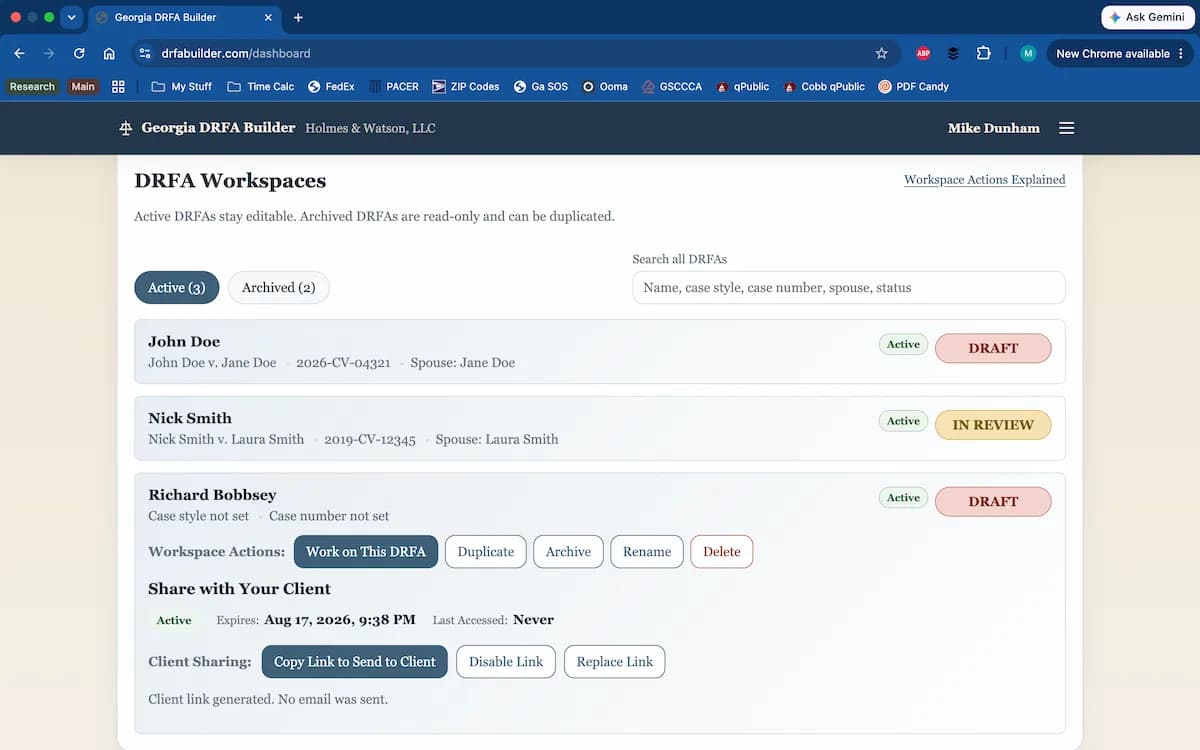
Your client receives a secure link and can begin working immediately in a web browser. No account logins, no passwords, and no special software.
No special software. Virtually no learning curve. Your client doesn't even need to create an account. Georgia DRFA Builder does all this and more.
Get Started| The "Old" WayWord, Excel, email, paper... | Starter | Pro | EnterpriseUnlimited users | ||||
|---|---|---|---|---|---|---|---|
| Up to 3 users | Up to 8 users | Up to 15 users | Up to 25 users | ||||
| Collaboration and DraftingAttorney and Client collaborate in single shared workspace | |||||||
| Calculate figures automatically | |||||||
| Track running totals automatically | |||||||
| Save work automatically in real time | |||||||
| Explain unusual entries with endnotes | |||||||
| Documents and OutputUpload supporting documents securely | |||||||
| Capture documents with a phone camera | |||||||
| Generate a clean, Rule-compliant, ready-to-sign PDF | |||||||
| Regenerate revised affidavits with one click | |||||||
| Retain prior generated versions unless deleted | |||||||
| Access and SecurityUse the workspace on desktop, tablet, or mobile | |||||||
| Access client workspaces through secure client links | |||||||
| Protect information through encrypted connections | |||||||
| Use secure cloud hosting | |||||||
| Maintain automatic backups | |||||||
| Plan Capacity and CostWorkspaces | 0 collaborative workspaces | 3 | Unlimited | Unlimited | Unlimited | Unlimited | Unlimited |
| Users | 1 | 1 | Up to 3 | Up to 8 | Up to 15 | Up to 25 | Unlimited |
| Cost | Incalculable | Free forever | $49/mo or $490/yr | $99/mo or $990/yr | $179/mo or $1,790/yr | $299/mo or $2,990/yr | Contact us |
Annual Pro pricing reflects approximately two months free compared with paying monthly.
Collaboration and Drafting
Attorney and Client collaborate in single shared workspace
Calculate figures automatically
Track running totals automatically
Save work automatically in real time
Explain unusual entries with endnotes
Documents and Output
Upload supporting documents securely
Capture documents with a phone camera
Generate a clean, Rule-compliant, ready-to-sign PDF
Regenerate revised affidavits with one click
Retain prior generated versions unless deleted
Security
Use the workspace on desktop, tablet, or mobile
Access client workspaces through secure client links
Protect information through encrypted connections
Use secure cloud hosting
Maintain automatic backups
Plan Capacity and Cost
Choose the plan that's right for your practice.
Starter
- 3 workspaces
- 1 user
- Free forever
Pro
- Unlimited workspaces
- Up to 3 users for $49/mo or $490/yr
- Up to 8 users for $99/mo or $990/yr
- Up to 15 users for $179/mo or $1,790/yr
- Up to 25 users for $299/mo or $2,990/yr
Enterprise
- Unlimited workspaces
- Unlimited users
- Contact us for cost information
All plans include the same core drafting experience.
Frequently Asked Questions
What is a "DRFA"?
"DRFA" stands for "Domestic Relations Financial Affidavit", which is the financial disclosure required in most Georgia domestic relations cases under Uniform Superior Court Rule 24.2. Georgia DRFA Builder streamlines the process of gathering information, collaborating with clients, and generating a ready-to-sign affidavit.
Does my client need to install anything?
No. Your client receives a secure link and can begin working immediately in any modern web browser. No account creation, passwords, or software installation are required. Client links expire automatically. You can also regenerate or revoke them at any time.
Can my client use a phone or tablet?
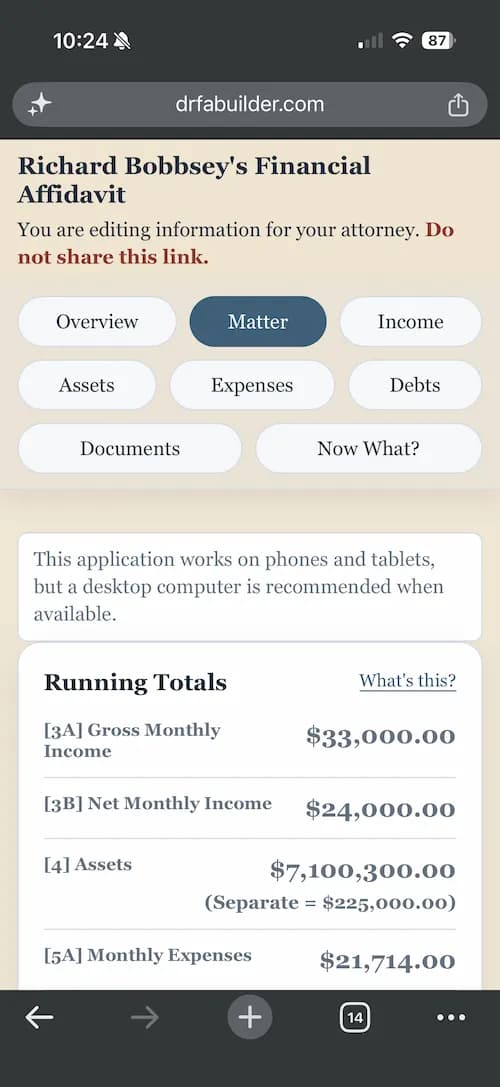
Yes. We think the best user experience is through a desktop or laptop, but we know some users (especially clients) are likely to use their mobile devices. Clients can complete information, upload documents, and even capture supporting documents with their phone's camera.
Can I review everything before generating the affidavit?
Absolutely. You remain in control of the final product. Review every entry, make edits, add endnotes where appropriate, and generate the affidavit only when you're satisfied it's ready. If you add or edit anything, you can regenerate, as often as you need, and all versions are saved unless you delete them.
Is my data secure?
Yes. Georgia DRFA Builder uses encrypted connections and secure cloud hosting to protect your information. Client access is limited to the workspaces you choose to share.
Can my paralegal or law partner work on a DRFA I've created?
Yes, any user in your organization can access and collaborate on your firm's workspaces (subject to any internal policies your organization may wish to impose).
What's the difference between a Starter plan and a Pro plan?
Starter plans are limited to three workspaces, which cannot be deleted or reused; Pro and Enterprise plans allow an unlimited number of workspaces without these restrictions. All other features are available to all plans with no limitations.
What are the differences between the paid plans?
All Pro and Enterprise plans use exactly the same app, with all features fully enabled, and allow an unlimited number of workspaces. The only difference is the size of the organization in terms of how many people will have user accounts to access the firm's workspaces. Pro plans are available for up to 25 users; larger organizations should contact us directly for a custom Enterprise plan, which will include a quote for pricing specific to your firm.
Can I upgrade later?
Yes. Upgrading is seamless. Your organization, workspaces, and data remain exactly where they are - you're just increasing your firm's user capacity.
Do I have to be an attorney to use the Georgia DRFA Builder?
No. While attorneys are our target audience, if you are handling your own case and looking for a tool that can assist you with drafting your own financial affidavit, Georgia DRFA Builder can help, and our free Starter plan is probably all you'll need. Just remember, this site is a drafting tool, not a substitute for legal advice.
Is Georgia DRFA Builder required by any court?
No. Georgia DRFA Builder is just a tool designed to make it easier to prepare a DRFA that complies with Uniform Superior Court Rule 24.2.
Does Georgia DRFA Builder use AI?
No. Although AI assisted in the development of Georgia DRFA Builder, the application itself does not use AI to process your data or generate your affidavit.
What about attorney-client privilege?
Attorneys may wish to advise their clients to be careful not to share a client link with a third party in a way that might waive a privilege, but there are no risks to using Georgia DRFA Builder that are different than the risks associated with the use of any other tool.
What is your cancellation policy?
You can cancel your subscription at any time. Your organization will retain access through the end of your current billing period.
Will this work outside Georgia?
No. Georgia DRFA Builder is designed specifically for Georgia Domestic Relations Financial Affidavits under Uniform Superior Court Rule 24.2. Our focus is on building the best possible experience for Georgia attorneys rather than trying to support multiple jurisdictions.
Who built the Georgia DRFA Builder?
Georgia DRFA Builder was created by a practicing Georgia family law attorney to meet a need and solve a problem. Every feature exists because it solved a real problem encountered while preparing DRFAs for actual clients.
Ready for a better way to prepare your next DRFA?
Start with our Starter plan. It's free forever, includes the same core drafting experience as our paid plans, and you can upgrade seamlessly whenever you're ready to leave "The Old Way" behind for good.
Get Started